BlotBench
AvailableWestern blots, from scanner to figure.
What it does
Turn the exposures your scanner made into the finished panel — pick the best exposure for each protein, crop it, and every strip lines itself up on the same lanes without you nudging anything.
- Drop in every exposure
- Crop each protein
- Export the panel
The files you upload are kept exactly as they came off the scanner. Crops, rotation and levels are settings in the experiment, never baked into an image, so changing your mind about an exposure at the end costs one click and the figure follows.
Who it is for. Anyone who runs westerns and then loses an evening in Illustrator lining strips up by eye — especially if you cut membranes into strips, so no two of them sit on the film at quite the same place.
In the app
What you get.
Every exposure, side by side
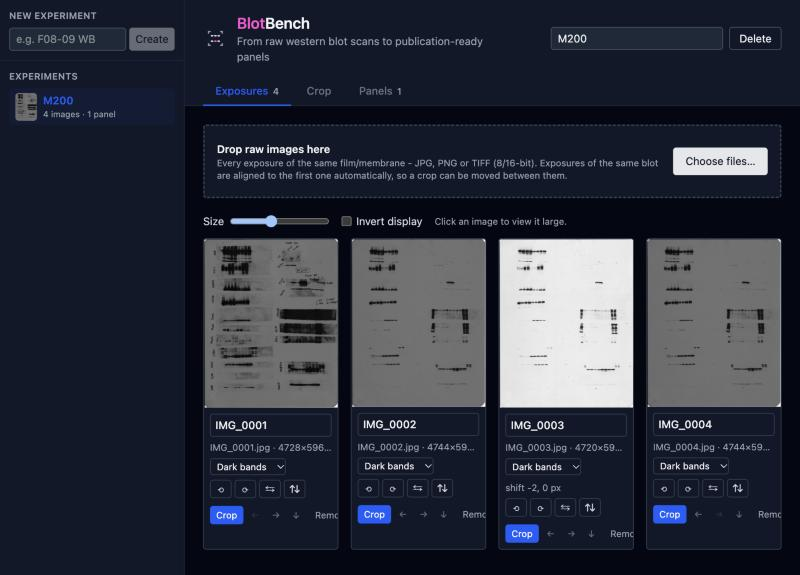
Drop in all the exposures of one film or membrane — JPG, PNG, TIFF, 8 or 16 bit. They are registered to the first one automatically, so a crop drawn once can be moved between them without redrawing it, and film is told apart from raw chemiluminescence on its own.
One protein at a time
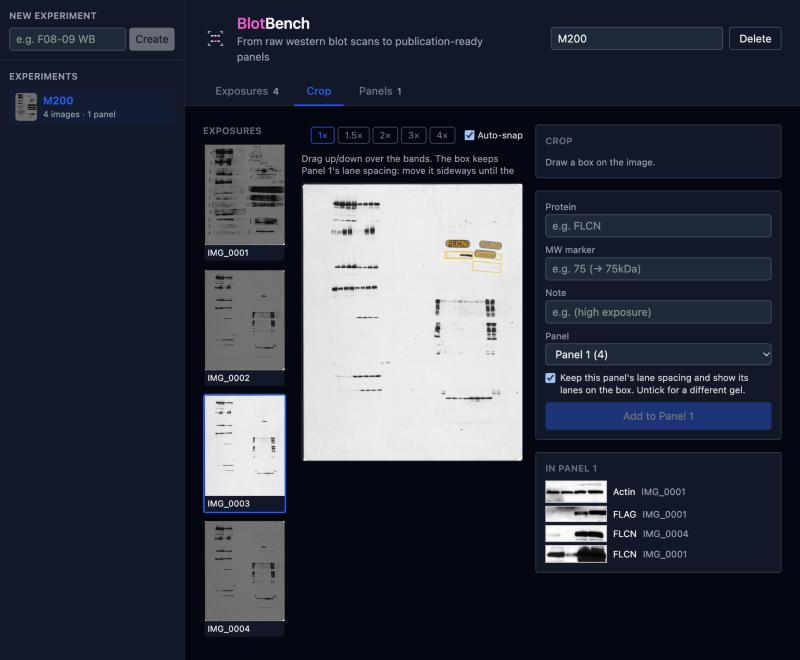
Draw a box around the bands and rotate it to straighten a tilted strip. The same box appears in every exposure below the image, so picking the one that is neither faint nor saturated is a click. Levels are ImageJ-style and applied to the whole crop.
Lanes found, strips snapped onto them
The first crop of a panel sets its lanes, detected from the bands themselves. Every later crop snaps onto those lanes, correcting both the shift and the slight stretch you get when a strip is laid on the film — so lane 1 of every strip ends up under lane 1 of the header.
The figure is edited on the figure
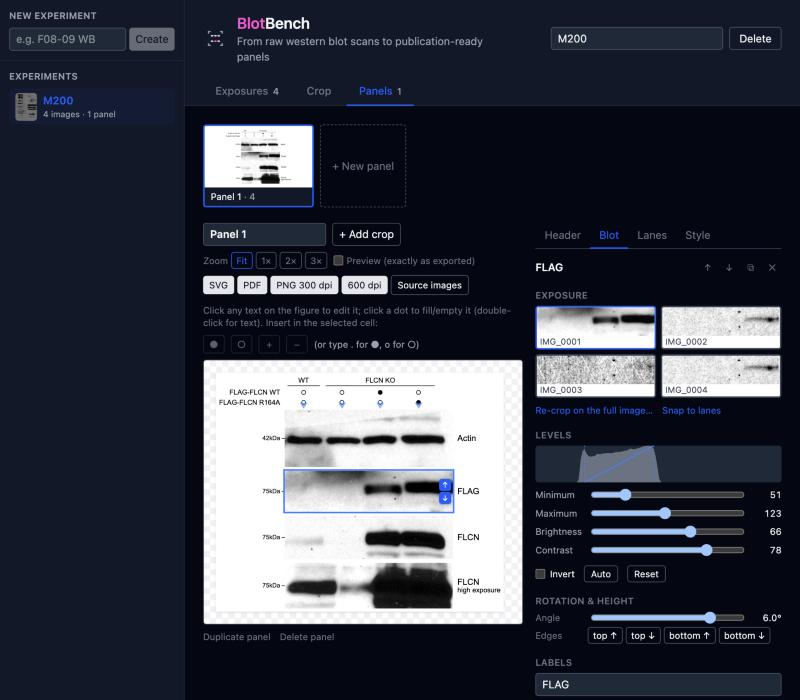
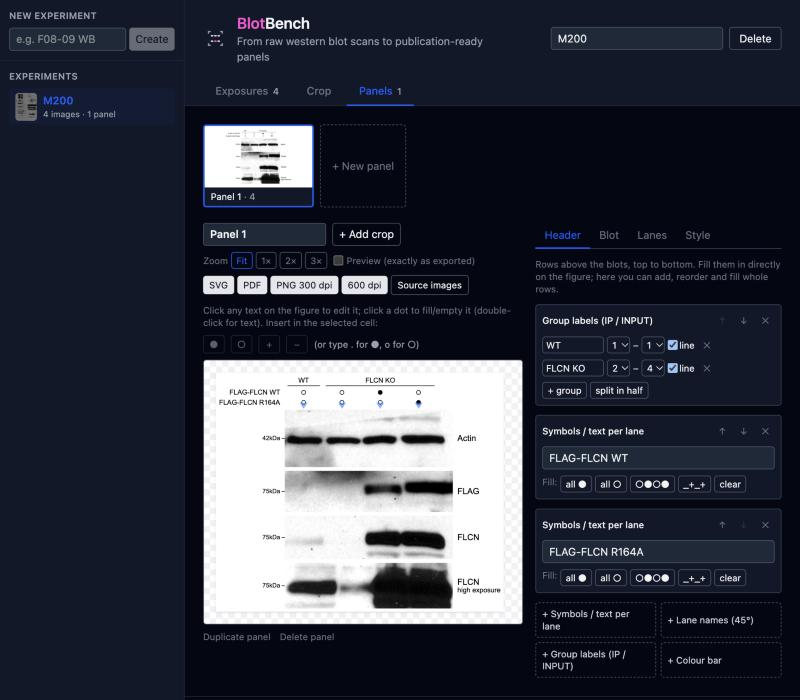
Click any text on the panel to change it. Rows of filled and empty dots per lane for treatments, lane names at 45 degrees, group labels spanning lanes with a line under them, colour bars. Blots are reordered by dragging them up and down.
The originals stay as they are
Uploaded images are copied into the experiment folder untouched. Nothing you do in the app rewrites a pixel of them, and the experiment saves itself as you work — there is no Save button to forget.
Export, source data included
PDF and SVG with real editable text and the crops embedded at their native resolution, PNG at 300 or 600 dpi, and the uncropped originals with every crop outlined and labelled — which is what a journal asks for as source data.
A walk through
What it looks like with a blot in it.
The real app, on one of the experiments it was built for. The other screens are stacked behind the one in front — move the mouse onto one and it comes forward.
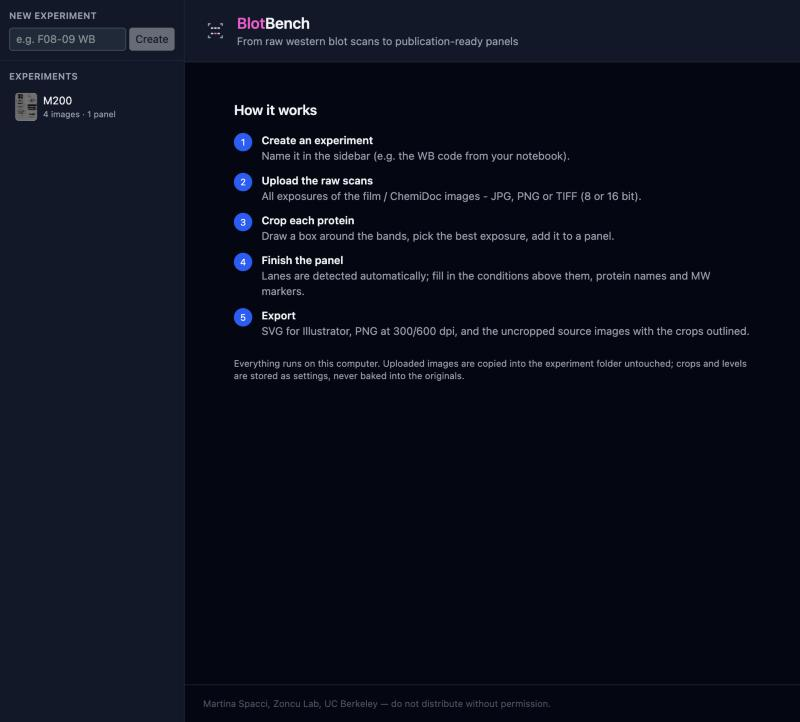
One experiment, named the way your notebook names it.
Everything for that blot lives in it: the raw scans and however many panels you build out of them. It saves as you go, so there is no Save button to forget. The first screen is the whole plan, which is also the whole app.
Drop in every exposure, not just the one you think is best.
All of them, JPG, PNG or TIFF, 8 or 16 bit. The exposures of one film are registered to each other as they land — the shift it worked out is printed under each — so a box drawn on one can be moved to another without redrawing it. Film and raw chemiluminescence are told apart on their own.
One box per protein, and the lanes line themselves up.
Draw a box around a protein's bands and name it. The first crop of a panel sets its lanes, found from the bands themselves; every later crop snaps onto those lanes, correcting both the sideways shift and the slight stretch you get when a strip is laid on the film. Lane 1 of every strip ends up under lane 1 of the header.
Change your mind about an exposure at the end.
Each blot keeps the same box in every exposure as a thumbnail: click a different one and the figure updates. The levels, and the angle that straightened a tilted strip, are settings on the crop rather than edits to the file — the scan on disk is never rewritten.
The figure is edited on the figure.
Click any text to change it. Filled and empty dots per lane for the conditions, group labels spanning lanes, MW markers you drag into place, blots reordered by dragging. Then PDF or SVG with real editable text and the crops at full resolution, PNG at 300 or 600 dpi, and the uncropped originals with every crop outlined — which is what a journal asks for as source data.
Requirements
What you need to run it.
- macOS
- macOS 12 Monterey or later, on Apple silicon (M1 and later). Intel Macs are not built.
- Windows
- Windows 10 or 11, 64-bit. The installer is built and checked by CI, but nobody has yet run it on a real Windows machine; say so if anything looks wrong on yours.
- Memory
- 8 GB RAM recommended
- Disk space
- About 433 MB once installed.
- macOS download
- BlotBench-1.1.0-arm64.dmg · 188 MB
- Windows download
- BlotBench-Setup-1.1.0.exe · 194 MB
- Signing
- Not code-signed yet — one extra click on first launch
- Good to know
- Runs entirely on your machine: your blots never leave your computer, and there is no Python, Terminal or account to set up. It does not check for updates — a new version is a new download. Experiments live in your own Application Support folder, not inside the app, so an update never touches them.